style.css
0.01MB
ui-kit.html
0.01MB
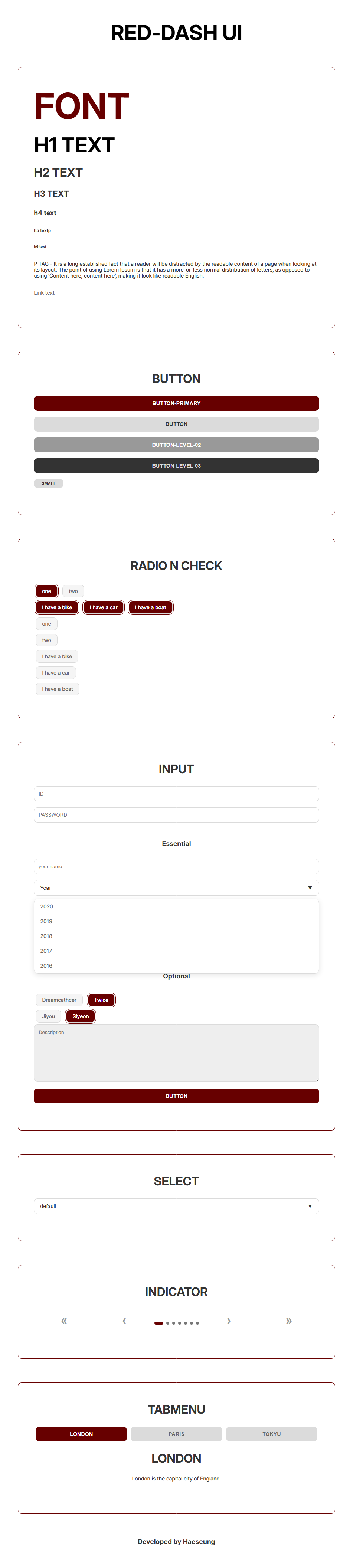
<!doctype html>
<html lang="en">


<head>
    <meta charset="UTF-8">
    <meta name="viewport" content="width=device-width, initial-scale=1, maximum-scale=3.0">
    <title>ui-kit</title>
    <link rel="stylesheet" href="style.css">
    <style type="text/css"></style>
    <script type="text/javascript" src="http://code.jquery.com/jquery-latest.js"></script>
    <script type="text/javascript" src="script.js"></script>
    <script type="text/javascript"></script>
</head>


<body>


    <h1>RED-DASH UI</h1>


    <article>

        <section>
            <p class="h-big">font</p>
            <h1 class="lefts">h1 text</h1>
            <h2 class="lefts">h2 text</h2>
            <h3 class="lefts">h3 text</h3>
            <h4 class="lefts">h4 text</h4>
            <h5 class="lefts">h5 textp</h5>
            <h6 class="lefts">h6 text</h6>
            <p>P TAG - It is a long established fact that a reader will be distracted by the readable content of a page
                when
                looking at its layout. The point of using Lorem Ipsum is that it has a more-or-less normal distribution
                of
                letters, as opposed to
                using 'Content here, content here', making it look like readable English.</p>
            <p><a href="">Link text</a></p>
        </section>

    </article>

    <article>

        <section>
            <h2>button</h2>
            <button class="button-primary">button-primary</button>
            <button class="button-level-01">button</button>
            <button class="button-level-02">button-level-02</button>
            <button class="button-level-03">button-level-03</button>
            <button class="button-small">small</button>
        </section>

    </article>

    <article>

        <section>
            <h2>radio n check</h2>
            <div>
                <div>
                    <input type="radio" id="opt-one" name="subject" value="">
                    <label for="opt-one">one</label>

                    <input type="radio" id="opt-two" name="subject" value="">
                    <label for="opt-two">two</label>
                </div>

                <div>
                    <input type="checkbox" id="vehicle1" name="vehicle1" value="bike">
                    <label for="vehicle1">I have a bike</label>

                    <input type="checkbox" id="vehicle2" name="vehicle2" value="Car">
                    <label for="vehicle2">I have a car</label>

                    <input type="checkbox" id="vehicle3" name="vehicle3" value="Boat">
                    <label for="vehicle3">I have a boat</label>
                </div>

                <div>
                    <input type="radio" id="radio-one-single" name="subject" value="">
                    <label for="radio-one-single">one</label>
                </div>

                <div>
                    <input type="radio" id="radio-two-single" name="subject" value="">
                    <label for="radio-two-single">two</label>
                </div>

                <div>
                    <input type="checkbox" id="vehicle1-single" name="vehicle1" value="Bike">
                    <label for="vehicle1-single">I have a bike</label>
                </div>

                <div>
                    <input type="checkbox" id="vehicle2-single" name="vehicle2" value="Car">
                    <label for="vehicle2-single">I have a car</label>
                </div>

                <div>
                    <input type="checkbox" id="vehicle3-single" name="vehicle3" value="Boat">
                    <label for="vehicle3-single">I have a boat</label>
                </div>
        </section>
    </article>

    <article>

        <section>

            <h2>Input</h2>

            <input type="text" placeholder="ID"></input>
            <input type="password" placeholder="PASSWORD"></input>

            <h4 class="margin-tops">Essential</h4>
            <input type="text" placeholder="your name"></input>
            <div>
                <div class="custom-select">
                    <button>Year <span>▼</span></button>
                    <ul>
                        <li>2020</li>
                        <li>2019</li>
                        <li>2018</li>
                        <li>2017</li>
                        <li>2016</li>
                    </ul>
                </div>

                <div class="custom-select">
                    <button>Month <span>▼</span></button>
                    <ul>
                        <li>1</li>
                        <li>2</li>
                        <li>3</li>
                        <li>4</li>
                        <li>5</li>
                    </ul>
                </div>

                <div class="custom-select">
                    <button>Date <span>▼</span></button>
                    <ul>
                        <li>1</li>
                        <li>2</li>
                        <li>3</li>
                        <li>4</li>
                        <li>5</li>
                    </ul>
                </div>
                <div>
                    <input type="radio" id="gender-female" name="gender" value="female">
                    <label for="gender-female">Female</label>

                    <input type="radio" id="gender-male" name="gender" value="male">
                    <label for="gender-male">Male</label>
                </div>
            </div>

            <h4 class="margin-tops">Optional</h4>
            <div>
                <input type="radio" id="opt-dreamcatcher" name="group1" value="">
                <label for="opt-dreamcatcher">Dreamcathcer</label>

                <input type="radio" id="opt-twice" name="group1" value="">
                <label for="opt-twice">Twice</label>
            </div>

            <div>
                <input type="radio" id="opt-jiyou" name="group2" value="">
                <label for="opt-jiyou">Jiyou</label>

                <input type="radio" id="opt-siyeon" name="group2" value="">
                <label for="opt-siyeon">Siyeon</label>
            </div>
            <textarea name="name" rows="8" placeholder="Description"></textarea>
            <button class="button-primary">button</button>
        </section>
    </article>


    <article>
        <section>
            <h2>Select</h2>
            <div class="custom-select">
                <button>default <span>▼</span></button>
                <ul>
                    <li>default</li>
                    <li>option1</li>
                    <li>option2</li>
                </ul>
            </div>
        </section>
    </article>


    <article>
        <section>
            <h2>Indicator</h2>
            <div class="space-betweens">
                <button class="indicator-button" id="btn-first">«</button>
                <button class="indicator-button" id="btn-prev">‹</button>

                <div class="indicator-dots">
                    <span class="dot active"></span>
                    <span class="dot"></span>
                    <span class="dot"></span>
                    <span class="dot"></span>
                    <span class="dot"></span>
                    <span class="dot"></span>
                    <span class="dot"></span>
                </div>
                <button class="indicator-button" id="btn-next">›</button>
                <button class="indicator-button" id="btn-last">»</button>
            </div>
        </section>
    </article>


    <article>
        <section>
            <h2>tabmenu</h2>
            <div>
                <div class="space-betweens">
                    <button class="tabmenu-button tablink tabmenu-color"
                        onclick="openCity(event, 'London')">London</button>
                    <button class="tabmenu-button tablink" onclick="openCity(event, 'Paris')">Paris</button>
                    <button class="tabmenu-button tablink" onclick="openCity(event, 'Tokyo')">Tokyu</button>
                </div>
                <div class="margin-tops centers">
                    <div id="London" class="city">
                        <h2>London</h2>
                        <p>London is the capital city of England.</p>
                    </div>
                    <div id="Paris" class="city" style="display: none;">
                        <h2>Paris</h2>
                        <p>Paris is the capital of France.</p>
                    </div>
                    <div id="Tokyo" class="city" style="display: none;">
                        <h2>Tokyo</h2>
                        <p>Tokyo is the capital of Japan.</p>
                    </div>
                </div>
            </div>
        </section>
    </article>

    <h4>Developed by Haeseung</h4>


    <script>

        function openCity(evt, cityName) {
            var i, x, tablinks;
            x =
                document.getElementsByClassName("city");
            for (i = 0; i < x.length; i++) {
                x[i].style.display = "none";
            }
            tablinks =
                document.getElementsByClassName("tablink");
            for (i = 0; i < tablinks.length; i++) {
                tablinks[i].className = tablinks[i].className.replace(" tabmenu-color", "")
            };
            document.getElementById(cityName).style.display = "block";

            evt.currentTarget.className += " tabmenu-color";
        }

        //--------------- 드롭다운 js 코드 ---------------
        // 드롭다운 버튼 클릭 시 열고 닫기
        document.querySelectorAll('.custom-select button').forEach(button => {
            button.addEventListener('click', function (e) {
                e.preventDefault();
                const parent = this.parentElement;

                // 다른 열려있는 드롭다운이 있다면 닫아줌
                document.querySelectorAll('.custom-select').forEach(select => {
                    if (select !== parent) {
                        select.classList.remove('open');
                    }
                });

                // 현재 클릭한 드롭다운 토글
                parent.classList.toggle('open');
            });
        });

        // 리스트(li) 항목 선택 시 글자 변경 및 닫기
        document.querySelectorAll('.custom-select li').forEach(item => {
            item.addEventListener('click', function () {

                // 현재 클릭한 li가 속한 부모 박스와 버튼 찾기
                const parent = this.closest('.custom-select');
                const button = parent.querySelector('button');

                // 버튼의 텍스트를 내가 클릭한 li의 글자로 바꾸기 (+ 화살표 유지)
                button.innerHTML = this.innerText + ' <span>▼</span>';

                // 메뉴창 닫기
                parent.classList.remove('open');
            });
        });
        // 드롭다운 바깥 영역 클릭 시 모든 창 닫기
        document.addEventListener('click', function (e) {
            // 클릭한 곳이 .custom-select 내부가 아니라면
            if (!e.target.closest('.custom-select')) {
                document.querySelectorAll('.custom-select').forEach(select => {
                    select.classList.remove('open'); // 싹 다 닫아줌
                });
            }
        });
        //---------------여기까지 드롭다운---------------


        //---------------인디케이터 모핑 닷 효과 js코드 ---------------
        // '.indicator-dots .dot' 클래스를 가진 모든 점을 찾아서 'dots'라는 배열(리스트)에 저장
        const dots = document.querySelectorAll('.indicator-dots .dot');

        // 각각의 조작 버튼들을 HTML의 id 속성으로 찾아서 변수에 저장
        const btnFirst = document.getElementById('btn-first');
        const btnPrev = document.getElementById('btn-prev');
        const btnNext = document.getElementById('btn-next');
        const btnLast = document.getElementById('btn-last');

        // 지금 몇 번째 점에 불이 들어와 있는지 기억하는 변수
        // 컴퓨터는 숫자를 0부터 세기 때문에, 처음 시작 위치는 0(첫 번째 점)
        let currentIndex = 0;

        // 괄호 안의 숫자를 받아서 해당 위치의 점에 불을 켜주는 역할
        function updateActiveDot(index) {
            // 일단 모든 점들을 하나씩 돌아가면서(forEach) 'active' 클래스를 지움 (모두 초기화)
            dots.forEach(dot => dot.classList.remove('active'));

            // 내가 이동하겠다고 지정한 번호(index)의 점에만 다시 'active' 클래스를 부여 (불 켜기)
            dots[index].classList.add('active');

            // 지금 활성화된 위치를 방금 이동한 위치(index)로 업데이트(그래야 다음 이동 때 안 헷갈림)
            currentIndex = index;
        }

        // (<<) 클릭 시
        btnFirst.addEventListener('click', () => {
            updateActiveDot(0); // 0번째(무조건 맨 처음) 점으로 바로 이동
        });

        // (<) 클릭 시
        btnPrev.addEventListener('click', () => {
            // 현재 위치가 0보다 클 때만 작동하게 막아둠 (맨 앞인데 더 앞으로 가면 에러)
            if (currentIndex > 0) {
                updateActiveDot(currentIndex - 1); // 현재 위치에서 1을 뺀 위치로 이동
            }
        });

        // (>) 클릭 시
        btnNext.addEventListener('click', () => {
            // 현재 위치가 맨 끝 번호보다 작을 때만 작동하게 막아둠
            // dots.length는 전체 점의 개수(예: 7개) 숫자는 0부터 세니까 마지막 번호는 6
            // 전체 개수에서 1을 뺀 값(dots.length - 1)과 비교
            if (currentIndex < dots.length - 1) {
                updateActiveDot(currentIndex + 1); // 현재 위치에서 1을 더한 위치로 이동
            }
        });

        // (>>) 클릭 시
        btnLast.addEventListener('click', () => {
            // 전체 개수에서 1을 뺀 번호(무조건 맨 마지막 번호)로 한 번에 이동
            updateActiveDot(dots.length - 1);
        });

        //---------------여기까지 인디케이터 모핑 닷---------------

    </script>
</body>

</html>
@charset "utf-8";
@import url('https://fonts.googleapis.com/css2?family=Inter:ital,opsz,wght@0,14..32,100..900;1,14..32,100..900&display=swap');
@import url('https://cdn.jsdelivr.net/gh/orioncactus/pretendard/dist/web/static/pretendard.css');
* {
margin: 0;
padding: 0;
box-sizing: border-box;
border: 0px solid #eee;
}
body {
margin: 60px 0;
font-family: 'pretendard', sans-serif;
font-size: 0.9rem;
line-height: 1rem;
color: #333;
letter-spacing: 0.1px;
word-break: keep-all;
}
img {
width: 100px;
}
h1,
h2,
h3,
h4,
h5,
h6 {
font-family: 'Inter', sans-serif;
margin-bottom: 30px;
text-align: center;
}
h1,
h2,
h3 {
text-transform: uppercase;
}
h1 {
font-size: 3.5rem;
line-height: 3.5rem;
color: black;
}
h2 {
font-size: 2rem;
line-height: 2rem;
}
h3 {
font-size: 1.4rem;
line-height: 1.4rem;
}
h4 {
font-size: 1.1rem;
line-height: 1.4rem;
}
h5 {
font-size: 0.7rem;
line-height: 0.7rem;
}
p {
margin-bottom: 30px;
}
a:link {
color: #666;
text-decoration: none;
}
a:visited {
color: #666;
}
a:hover {
color: red;
}
a:active {
color: red;
}
button {
width: 100%;
padding: 12px;
margin-bottom: 16px;
background: #fff;
text-align: center;
font-size: 0.9rem;
font-weight: bold;
border: 0px solid #444;
border-radius: 10px;
color: #666;
text-transform: uppercase;
transition: 0.3s;
cursor: pointer;
}
article {
margin: 64px 5%;
border: 1px solid #670000;
border-radius: 10px;
}
section {
padding: 56px 5%;
}
/* form default */
input,
select {
padding: 12px;
margin-bottom: 16px;
color: #333;
background: #fff;
border: 1px solid #dbdbdb;
border-radius: 10px;
outline: none;
transition: 0.4s;
}
input:focus {
border: 1px solid #670000;
box-shadow: inset 0 0 0 1px #670000;
background: #eeeeee;
}
select:focus {
border: 2px solid #670000;
}
textarea {
padding: 12px;
margin-bottom: 16px;
color: #999;
background: #fff;
}
input[type="radio"],
input[type="checkbox"] {
display: none;
}
input[type="radio"]+label,
input[type="checkbox"]+label {
display: inline-block;
padding: 8px 16px;
margin: 5px;
background-color: #f5f5f5;
border: 1px solid #dbdbdb;
border-radius: 10px;
cursor: pointer;
color: #666;
}
input[type="radio"]:checked+label,
input[type="checkbox"]:checked+label {
background-color: #670000;
color: #ffffff;
text-shadow: 0 0 0.6px #fff, 0 0 0.6px #fff;
outline: 1px solid #670000;
outline-offset: 2px;
}
/* 드롭다운 전체를 감싸는 */
.custom-select {
position: relative;
width: 100%;
margin-bottom: 16px;
}
/* 기존 select 박스 역할 */
.custom-select button {
width: 100%;
padding: 12px 16px;
background: #fff;
border: 1px solid #dbdbdb;
border-radius: 10px;
color: #333;
font-size: 0.9rem;
font-weight: normal;
text-align: left;
text-transform: none;
cursor: pointer;
display: flex;
justify-content: space-between;
align-items: center;
margin-bottom: 0;
}
.custom-select button:focus {
border-color: #670000;
}
/* 클릭하면 아래로 떨어져 나오는 박스 */
.custom-select ul {
position: absolute;
top: calc(100% + 8px);
/* 버튼 높이에서 8px 띄움 */
left: 0;
width: 100%;
background: #fff;
border: 1px solid #dbdbdb;
border-radius: 12px;
box-shadow: 0 4px 15px rgba(0, 0, 0, 0.1);
list-style: none;
display: none;
z-index: 10;
overflow: hidden;
}
/* js로 opne 클래스가 붙으면 메뉴가 보이게 함 */
.custom-select.open ul {
display: block;
}
.custom-select li {
padding: 12px 16px;
color: #666;
cursor: pointer;
transition: background 0.2s;
}
.custom-select li:hover {
background: #f9f9f9;
color: #670000;
font-weight: bold;
}
textarea {
width: 100%;
background: #eee;
border-radius: 10px;
border: 1px solid #dbdbdb;
font-family: 'pretendard', sans-serif;
outline: none;
transition: 0.3s;
}
textarea:focus {
color: #000;
border: 1px solid #670000;
box-shadow: inset 0 0 0 1px #670000;
}
input[type="text"],
input[type="password"],
input[type="search"] input[type="tel"] {
width: 100%;
}
/* design default */
.h-big {
font-family: 'Inter', sans-serif;
font-size: 6rem;
font-weight: bold;
margin-bottom: 30px;
text-transform: uppercase;
line-height: 6rem;
color: #670000;
}
.lefts {
text-align: left;
}
.button-primary {
background: #670000;
color: #ffffff;
}
.button-level-01 {
background: #dbdbdb;
color: #333333;
}
.button-level-01:hover {
background: #f1f1f1;
color: #670000;
}
.button-level-02 {
background: #999999;
color: #ffffff;
}
.button-level-03 {
background: #333333;
color: #dbdbdb;
}
.button-primary:hover,
.button-level-02:hover,
.button-level-03:hover {
background: #dbdbdb;
color: #670000;
}
.button-small {
width: 80px;
padding: 6px;
background: #dbdbdb;
text-align: center;
font-size: 0.7rem;
border: 0px solid #670000;
color: #333333;
text-transform: uppercase;
transition: 0.5s;
cursor: pointer;
}
.button-small:hover {
background: #999999;
color: #670000;
}
.margin-tops {
margin-top: 30px;
}
.space-betweens {
display: flex;
justify-content: space-between;
}
.indicator-button {
font-size: 2rem;
color: #999;
}
.indicator-button:hover {
color: #333;
}
.indicator-dots {
display: flex;
align-items: center;
gap: 8px;
}
.dot {
width: 8px;
height: 8px;
background: #777;
border-radius: 4px;
transition: all 0.3s ease;
cursor: pointer;
}
.dot.active {
width: 24px;
background: #670000;
}
.tabmenu-button {
background: #dbdbdb;
width: 100%;
margin: 0 5px;
}
.tabmenu-color {
background: #670000;
color: white;
}
.none {
display: none;
}
.centers {
text-align: center;
}
.tabmenu-button:hover {
background: #670000;
border: 0px solid #111;
color: #fff;
}
/* mobile */
/* labtop */
@media screen and (min-width: 1366px) {
article {
width: 600px;
margin: 48px auto;
}
}'코딩 > 실습' 카테고리의 다른 글
| HC-12 스튜디오 JT (0) | 2026.05.08 |
|---|---|
| AWD 디자인 리뉴얼 (1) | 2026.04.21 |
| AWD 콘텐츠 리뉴얼 (0) | 2026.04.17 |
| RWD 디자인 리뉴얼 (0) | 2026.04.16 |
| RWD 콘텐츠 리뉴얼 (0) | 2026.04.16 |